
Authentication
Learn how Residential Proxy authentication works, how your username pattern sets the proxy configuration, and how to test and troubleshoot it.
Authentication Formats
Residential Proxy uses a flexible username-based authentication system where your username pattern determines the proxy configuration. All proxies connect through the same endpoint but behave differently based on your username structure.
Connection Format
All Residential Proxy connections use the following format:
username:password@proxy.mrscraper.com:10000The username controls:
- Proxy type
- Country targeting
- Session persistence
- Session duration
- IP rotation behavior
Authentication Patterns
1. Default (United States)
The simplest format uses just your username and password without any modifiers.
Format:
username:password@proxy.mrscraper.com:10000Behavior:
- Residential Proxy falls back to United States (
us) IPs - IP rotates on each new request
- No session persistence
Example:
curl -x "user123:pass456@proxy.mrscraper.com:10000" https://api.ipify.orgNote: The UI always requires a country selection; only manual username configuration lets you omit it. Omitting it is not random assignment — it resolves to the US, so state the country explicitly whenever the target region matters.
2. Country-Specific Proxy
Target a specific country using ISO 3166 country codes.
Format:
username-country-{iso3166}:password@proxy.mrscraper.com:10000Parameters:
{iso3166}: 2-letter ISO 3166 country code (e.g.,US,GB,DE,JP)
Behavior:
- All requests use IPs from the specified country
- IP rotates on each new request
- No session persistence
Examples:
# Target US proxies
user123-country-us:pass456@proxy.mrscraper.com:10000
Use Cases:
- Accessing geo-restricted content
- Testing localized websites
- Market research in specific regions
- Price comparison across countries
3. Session-Based Static Proxy
Maintain the same IP across multiple requests using session IDs.
Format:
username-country-{iso3166}-sessid-{session_id}:password@proxy.mrscraper.com:10000Parameters:
{iso3166}: 2-letter ISO 3166 country code{session_id}: Any alphanumeric string (e.g.,session1,user_alpha,x9)
Behavior:
- Same IP for all requests with the same
session_id - Default session duration: 10 minutes
- After expiration, a new IP is assigned
- Different
session_idvalues get different IPs
Examples:
# Session ID: alpha1
user123-country-us-sessid-alpha1:pass456@proxy.mrscraper.com:10000
Python Example:
import requests

proxy = {
    'http': 'http://user123-country-us-sessid-session1:pass456@proxy.mrscraper.com:10000',
    'https': 'http://user123-country-us-sessid-session1:pass456@proxy.mrscraper.com:10000'
}

# All these requests use the same IP
for i in range(5):
    response = requests.get('https://api.ipify.org', proxies=proxy)
    print(f"Request {i+1}: {response.text}")  # Same IP for all
Use Cases:
- Account management and login sessions
- Shopping cart operations
- Dashboard interactions
- Form submissions requiring consistent IP
4. Custom Session Duration
Control exactly how long a session IP persists.
Format:
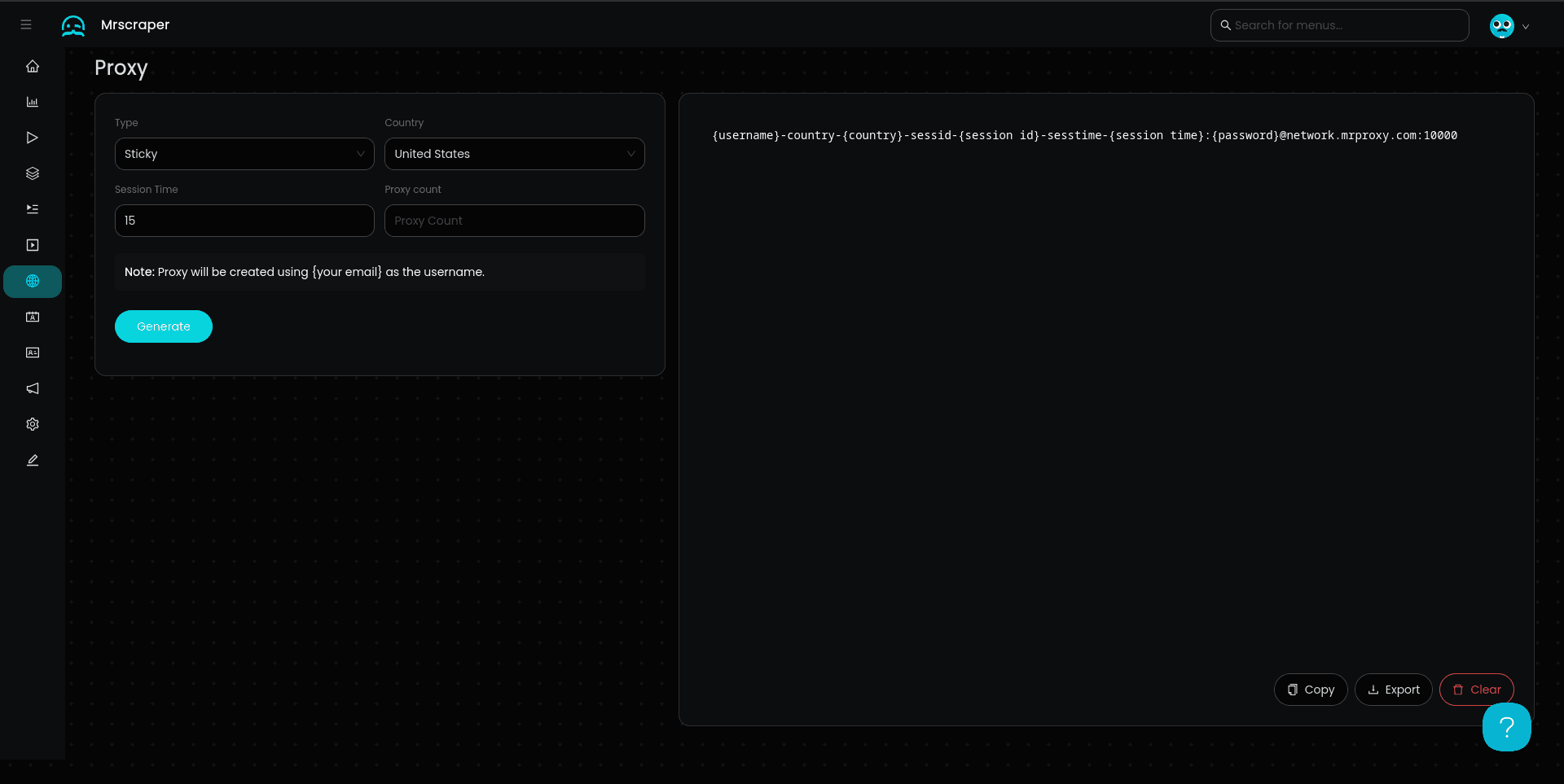
username-country-{iso3166}-sessid-{session_id}-sesstime-{minutes}:password@proxy.mrscraper.com:10000Parameters:
{iso3166}: 2-letter ISO 3166 country code{session_id}: Alphanumeric session identifier{minutes}: Session duration in minutes (integer)
Behavior:
- Same IP for all requests with the same
session_id - Session expires after
{minutes}minutes - New IP assigned after expiration
- Maximum flexibility for session management
Examples:
# Session lasts 30 minutes
user123-country-jp-sessid-x9-sesstime-30:pass456@proxy.mrscraper.com:10000
Node.js Example:
const axios = require('axios');

// 20-minute session proxy
const proxy = {
  host: 'proxy.mrscraper.com',
  port: 10000,
  auth: {
    username: 'user123-country-us-sessid-node_session-sesstime-20',
    password: 'pass456'
  }
};

async function testProxy() {
  for (let i = 0; i < 10; i++) {
    const response = await axios.get('https://api.ipify.org', { proxy });
    console.log(`Request ${i+1}: ${response.data}`);

    // Wait 2 minutes between requests
    await new Promise(resolve => setTimeout(resolve, 120000));
  }
}

testProxy();
Use Cases:
- Long scraping sessions
- Extended browsing sessions
- Multi-step workflows
- Testing with specific time constraints
Authentication Summary
| Format | Country | Session | Duration | Rotation |
|---|---|---|---|---|
username:password | US (default) | No | N/A | Every request |
username-country-{code} | Specific | No | N/A | Every request |
username-country-{code}-sessid-{id} | Specific | Yes | 10 min | After expiry |
username-country-{code}-sessid-{id}-sesstime-{min} | Specific | No | Custom | After expiry |
Best Practices
Session ID Naming
- Use descriptive names:
user_john,checkout_session,scraper_1 - Avoid special characters (stick to alphanumeric and underscores)
- Keep IDs under 50 characters for compatibility
Security Considerations
- Never hardcode credentials in source code
- Use environment variables for username/password
- Rotate session IDs regularly
- Monitor proxy usage for anomalies
Testing Your Configuration
Test your proxy configuration with a simple cURL command:
curl -x "username-country-us:password@proxy.mrscraper.com:10000" https://api.ipify.orgThis returns your current proxy IP address. Run it multiple times to verify rotation behavior:
# Test rotation
for i in {1..5}; do
  echo "Request $i:"
  curl -x "user-country-us:pass@proxy.mrscraper.com:10000" https://api.ipify.org
  echo ""
done
For session-based proxies, you should see the same IP across all requests:
# Test session persistence
for i in {1..5}; do
  echo "Request $i:"
  curl -x "user-country-us-sessid-test1:pass@proxy.mrscraper.com:10000" https://api.ipify.org
  echo ""
done
Common Errors
Authentication Failed
- Verify your username and password are correct
- Check for typos in the format pattern
- Ensure no extra spaces in the username
Country Not Supported
- Verify the country code is valid ISO 3166 format
- Check that the country is in Residential Proxy's coverage area
- Try a different country code
Session Expired
- Increase
sesstimevalue if sessions expire too quickly - Implement automatic reconnection in your code
- Use the same
session_idto maintain the session
Verify a Block Manually
Replay a real browsing session through your Residential Proxy to tell whether a block comes from the target website or from the proxy itself.
IP Authorization
Authorize trusted IP addresses to use MrScraper Residential Proxy without sending a username and password, and manage your whitelist securely.