
Proxy Generator
Learn how to use the MrScraper dashboard proxy generator to quickly create proxy configurations.
Proxy Generator
The MrScraper dashboard includes a powerful Proxy Generator tool that helps you quickly create proxy configurations without manually constructing username strings. This visual tool is perfect for generating multiple proxy configurations at once.
What is the Proxy Generator?
The Proxy Generator is a UI-based tool in the MrScraper dashboard that allows you to:
- Generate multiple proxy configurations instantly
- Visualize your proxy setup before deployment
- Copy ready-to-use proxy strings
- Export configurations for different tools and languages
- Test proxy configurations quickly
Access: The Proxy Generator is available in your MrScraper dashboard under the "Proxy Configuration" section.
Features
1. Proxy Count (Static Mode Only)
Generate multiple static proxy configurations at once with different session IDs.
Note: Proxy Count is only available for Static mode. Rotating mode generates a single proxy configuration.
Use Case:
- Creating multiple sessions for parallel scraping
- Distributing tasks across different IPs
- Testing with various proxy instances
How It Works:
- Specify the number of proxies needed (e.g., 5, 10, 50)
- Each proxy gets a unique session ID
- All proxies use the same configuration but maintain separate IPs
Example Output:
# Request 5 proxies, get 5 unique configurations:
user-country-us-sessid-gen-1:pass@proxy.mrscraper.com:10000
user-country-us-sessid-gen-2:pass@proxy.mrscraper.com:10000
user-country-us-sessid-gen-3:pass@proxy.mrscraper.com:10000
user-country-us-sessid-gen-4:pass@proxy.mrscraper.com:10000
user-country-us-sessid-gen-5:pass@proxy.mrscraper.com:10000
2. Country Selector
Choose your target country from a dropdown list of available countries.
Features:
- Visual country selection (no need to memorize codes)
- Search functionality for quick country finding
- Validation to ensure country availability
- Required field (cannot be skipped in UI)
Countries Displayed:
- All supported ISO 3166 countries
- Flag icons for visual reference
- Full country names with codes
UI Requirement: Unlike manual configuration, the Proxy Generator requires country selection. You cannot generate random-country proxies through the UI.
3. Session ID (Static Mode Only)
Specify a custom session ID prefix for your generated proxies.
Note: Session ID is only available for Static mode. Rotating proxies don't use sessions.
Features:
- Optional field (auto-generated if empty)
- Alphanumeric characters allowed
- Adds your prefix to each proxy
Without Custom Session ID:
# Auto-generated session IDs
user-country-us-sessid-auto-1:pass@proxy.mrscraper.com:10000
user-country-us-sessid-auto-2:pass@proxy.mrscraper.com:10000
With Custom Session ID (mysession):
# Your prefix + counter
user-country-us-sessid-mysession-1:pass@proxy.mrscraper.com:10000
user-country-us-sessid-mysession-2:pass@proxy.mrscraper.com:10000
Best Practices:
- Use descriptive names:
scraper,bot,worker - Keep it short and simple
- Avoid special characters (use alphanumeric + underscores)
4. Static / Rotating Toggle
Switch between static (session-based) and rotating proxy modes.
Static Mode (Session-Based)
Static Proxy
Maintains the same IP for each session ID until expiration.
Output Format:
username-country-{code}-sessid-{id}:password@proxy.mrscraper.com:10000Behavior:
- Each unique session ID gets a persistent IP
- Default session time: 10 minutes
- Perfect for account operations
UI Fields Available:
- ✅ Proxy Count
- ✅ Country Selector
- ✅ Session ID
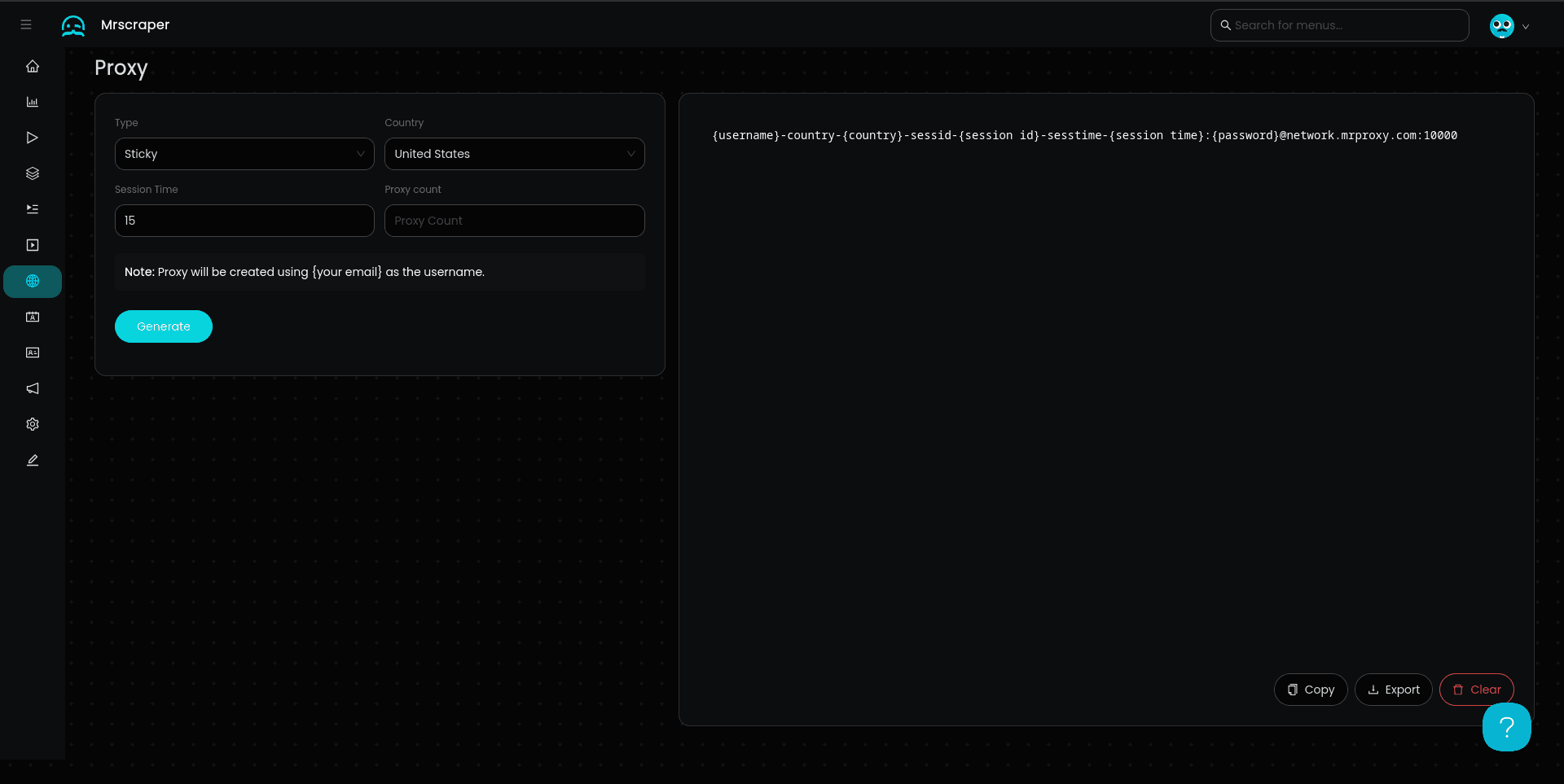
- ✅ Session Time (optional, in minutes)
Example:
# Each session maintains its own IP
user-country-us-sessid-session1:pass@proxy.mrscraper.com:10000  # IP: 203.0.113.10
user-country-us-sessid-session2:pass@proxy.mrscraper.com:10000  # IP: 198.51.100.42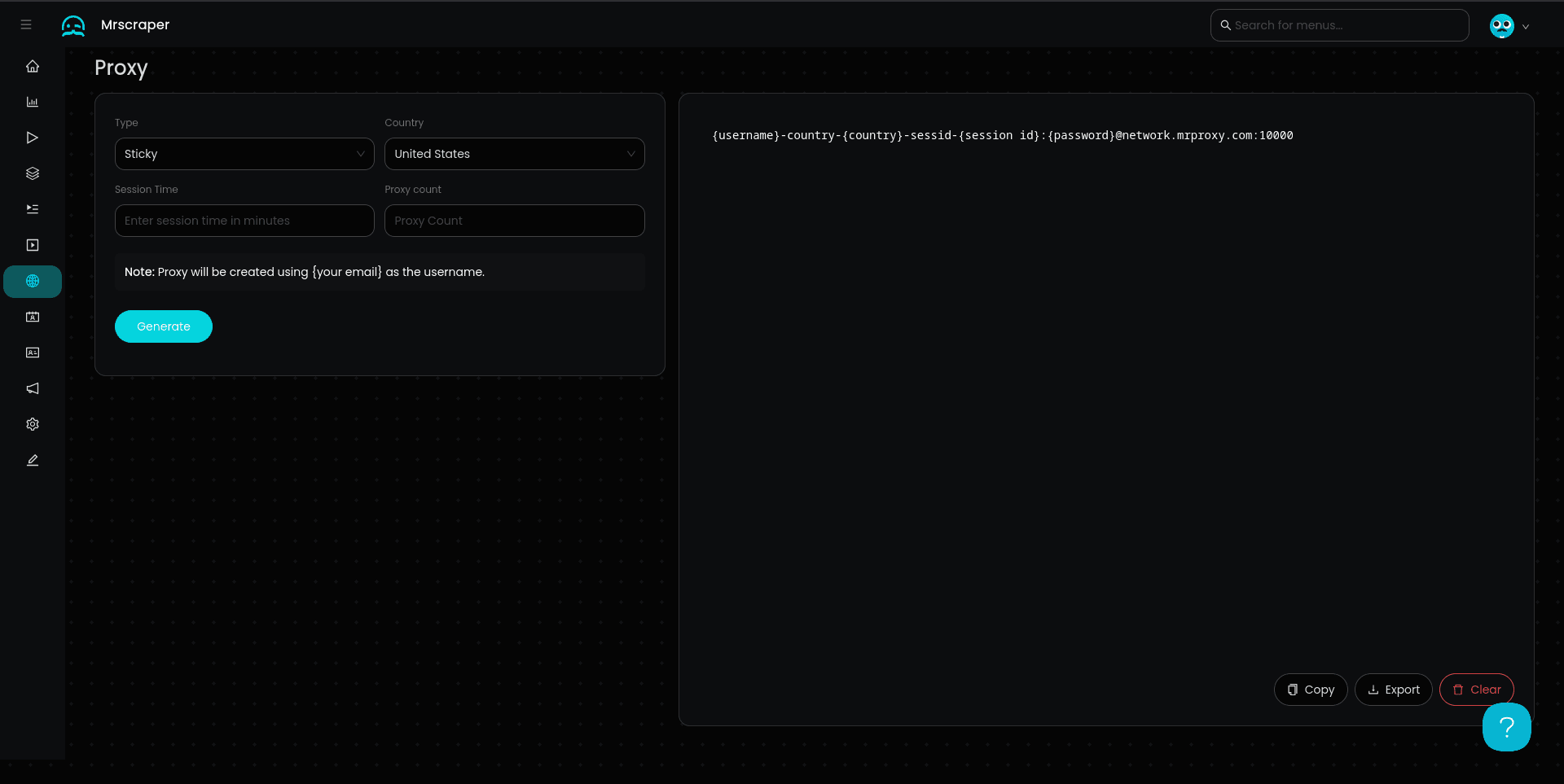
With Custom Session Time:
You can also specify a custom session duration in the UI:
Rotating Mode
Rotating Proxy
Changes IP on each new request for maximum distribution.
Output Format:
username-country-{code}:password@proxy.mrscraper.com:10000Behavior:
- New IP for every request
- No session persistence
- Perfect for large-scale scraping
UI Fields Available:
- ✅ Country Selector
- ❌ Proxy Count (not available)
- ❌ Session ID (not applicable)
- ❌ Session Time (not applicable)
Example:
# All requests to this proxy get different IPs
user-country-us:pass@proxy.mrscraper.com:10000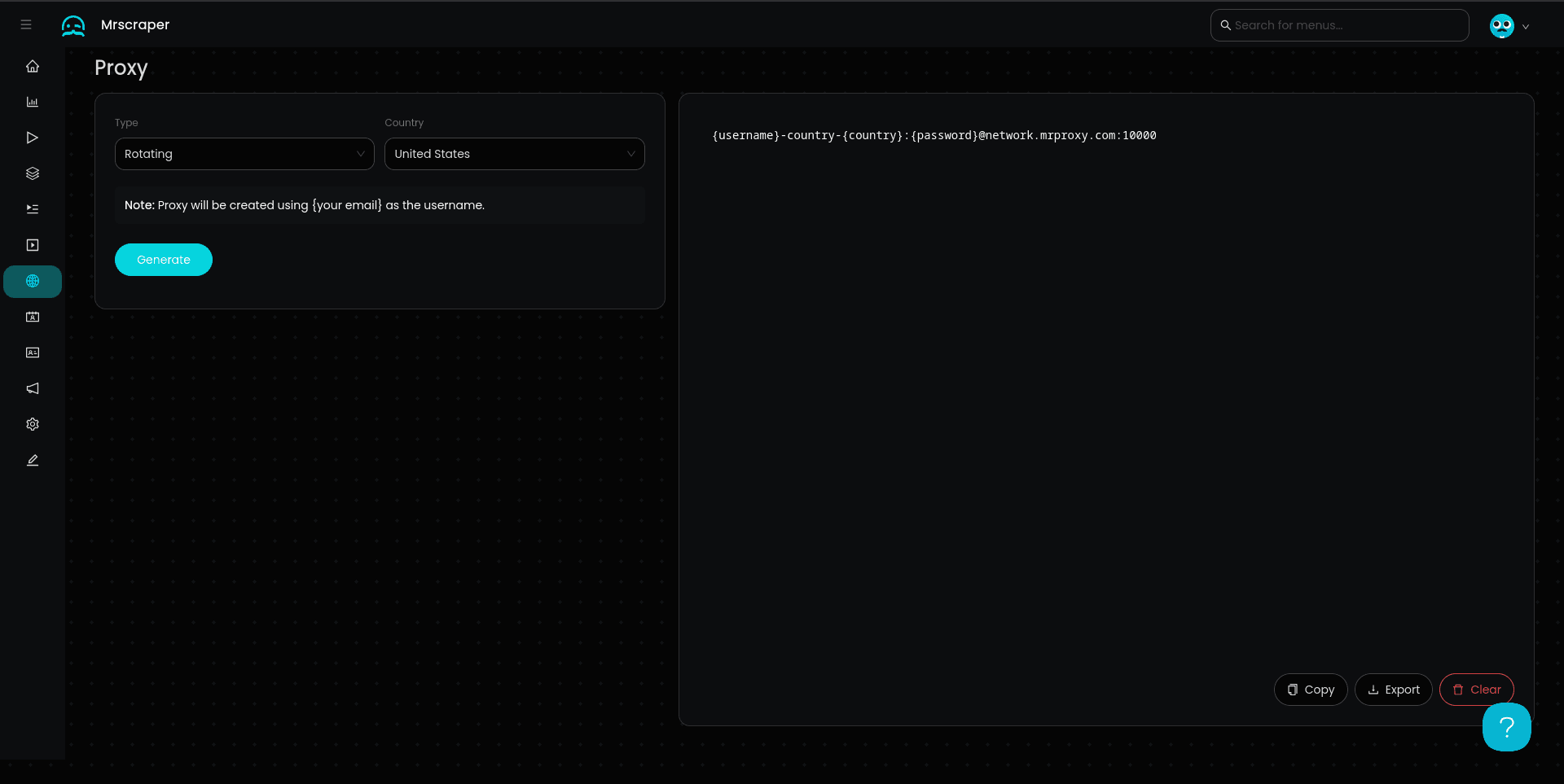
Note: In rotating mode, you only need one configuration since each request automatically gets a different IP. The UI generates a single proxy configuration.
How to Use the Proxy Generator
Step 1: Access the Dashboard
Log in to your MrScraper account and navigate to the Proxy Configuration section in your dashboard.
Step 2: Configure Your Proxies
Fill in the configuration options:
- Proxy Count: Number of proxy instances needed
- Country: Select from dropdown (required)
- Session ID: Custom prefix (optional)
- Mode: Toggle between Static and Rotating
Step 3: Generate Templates
Click the "Generate" or "Create Templates" button to create your proxy configurations.
Step 4: Copy & Use
Copy the generated proxy strings and use them in your application. Each proxy is ready to use immediately.
Output Formats
The Proxy Generator can export proxies in different formats:
Plain Text Format
user-country-us-sessid-worker1:pass@proxy.mrscraper.com:10000
user-country-us-sessid-worker2:pass@proxy.mrscraper.com:10000
user-country-us-sessid-worker3:pass@proxy.mrscraper.com:10000
cURL Format
curl -x "user-country-us-sessid-worker1:pass@proxy.mrscraper.com:10000" https://example.com
curl -x "user-country-us-sessid-worker2:pass@proxy.mrscraper.com:10000" https://example.com
Python Dictionary Format
proxies = [
    {
        'http': 'http://user-country-us-sessid-worker1:pass@proxy.mrscraper.com:10000',
        'https': 'http://user-country-us-sessid-worker1:pass@proxy.mrscraper.com:10000'
    },
    {
        'http': 'http://user-country-us-sessid-worker2:pass@proxy.mrscraper.com:10000',
        'https': 'http://user-country-us-sessid-worker2:pass@proxy.mrscraper.com:10000'
    }
]
JSON Format
[
  {
    "host": "proxy.mrscraper.com",
    "port": 10000,
    "username": "user-country-us-sessid-worker1",
    "password": "pass"
  },
  {
    "host": "proxy.mrscraper.com",
    "port": 10000,
    "username": "user-country-us-sessid-worker2",
    "password": "pass"
  }
]
Common Use Cases
1. Parallel Web Scraping
Generate multiple static proxies for parallel scraping tasks:
Configuration:
- Proxy Count:
10 - Country:
United States - Session ID:
scraper - Mode:
Static
Generated:
user-country-us-sessid-scraper-1:pass@proxy.mrscraper.com:10000
user-country-us-sessid-scraper-2:pass@proxy.mrscraper.com:10000
...
user-country-us-sessid-scraper-10:pass@proxy.mrscraper.com:10000
Usage:
import requests
from concurrent.futures import ThreadPoolExecutor

proxies = [
    {'http': f'http://user-country-us-sessid-scraper-{i}:pass@proxy.mrscraper.com:10000'}
    for i in range(1, 11)
]

def scrape(proxy):
    return requests.get('https://example.com', proxies=proxy)

with ThreadPoolExecutor(max_workers=10) as executor:
    results = executor.map(scrape, proxies)
2. Multi-Account Management
Create separate sessions for managing multiple accounts:
Configuration:
- Proxy Count:
5 - Country:
United Kingdom - Session ID:
account - Mode:
Static
Generated:
user-country-uk-sessid-account-1:pass@proxy.mrscraper.com:10000
user-country-uk-sessid-account-2:pass@proxy.mrscraper.com:10000
...
Each account maintains its own consistent IP address.
3. Rotating Proxy Pool
Generate rotating proxies for distribution across workers:
Configuration:
- Proxy Count:
1 - Country:
Germany - Mode:
Rotating
Generated:
user-country-de:pass@proxy.mrscraper.com:10000All workers use this single configuration, but each request gets a different IP.
Tips & Best Practices
Session ID Naming
✅ Good Names:
worker-1,worker-2,worker-3scraper-alpha,scraper-betaaccount-john,account-janetask-a,task-b,task-c
❌ Avoid:
- Special characters:
worker@1,user#5 - Spaces:
my session - Very long names:
this-is-a-very-long-session-name-that-is-hard-to-manage
Proxy Count Selection
- Small tasks: 1-5 proxies
- Medium scraping: 10-25 proxies
- Large-scale operations: 50+ proxies
Country Selection
Choose countries based on:
- Your target website's location
- Data privacy regulations
- Proxy pool availability
- Response time requirements
Mode Selection
- Static: For sessions, logins, stateful operations
- Rotating: For large-scale scraping, avoiding rate limits
Troubleshooting
Can't Find Country in Dropdown
Issue: Desired country not showing in selector Solution:
- Check if the country is in MrScraper's coverage
- Try searching by country code (e.g., "us", "uk")
- Contact support to request country addition
Generated Proxies Not Working
Issue: Copied proxies fail to connect Solution:
- Verify credentials are correct
- Check for extra spaces when copying
- Test with a simple cURL command first
- Ensure selected country is available
Manual Configuration vs Proxy Generator
| Feature | Proxy Generator | Manual Configuration |
|---|---|---|
| Ease of Use | ✅ Visual, easy | ⚠️ Requires knowledge |
| Random Country | ❌ Not supported | ✅ Supported |
| Custom Session Time | ⚠️ Limited | ✅ Fully customizable |
| Bulk Generation | ✅ Easy | ⚠️ Manual work |
| Learning Curve | ✅ Low | ⚠️ Moderate |