
Response Headers
Learn how to monitor token usage, bandwidth usage, execution runtime, and target HTTP status codes returned in API response headers.
When making requests via MrScraper's Manual API and Web Fetching API, essential metrics about your request execution are returned directly in the HTTP response headers.
These response headers allow you to programmatically monitor resource consumption, response timing, and target page statuses without parsing separate metadata fields.
API Compatibility Note
Response header metrics (token_usage, bandwidth_usage, runtime, and x-status-code) are only supported when using the Manual Scraper API and Web Fetching API.
Key Response Headers
Every scraping response includes metadata headers detailing execution metrics:
| Header Name | Type | Description |
|---|---|---|
token_usage | number | The total number of API tokens consumed by the scraping request. |
bandwidth_usage | number | The total data bandwidth consumed by the request (in Megabytes/MB). |
runtime | float | Total execution runtime for the request in seconds. |
x-status-code | integer | The HTTP status code returned by the target website being scraped. |
Additional Headers
Responses may also include x-result-id (a unique identifier for the execution result).
Target Status Code (x-status-code)
The x-status-code response header allows you to programmatically detect the status of the target page being scraped:
- Success (
2xx): Indicates the target page was fetched successfully (e.g.,200 OK). - Forbidden / Blocked (
403): Indicates access was blocked or denied by the target site. - Page Not Found (
404): Indicates the requested page was not found on the target site. - Target Server Error (
500): Indicates an internal error occurred on the target website's server.
Example API Request & Response Headers
cURL Example
Below is an example request using the Manual / Web Fetching API:
curl --location 'https://api.mrscraper.com?token=<MRSCRAPER_API_TOKEN>&geoCode=us&html=true&proxyCountry=us&url=https%3A%2F%2Fwww.scrapethissite.com' \
  -H 'x-api-token: <MRSCRAPER_API_TOKEN>'
Sample HTTP Response Headers
When inspecting the headers returned by the server, you will receive output similar to the following:
HTTP/1.1 200 OK
Server: nginx
Content-Type: text/html; charset=utf-8
token_usage: 2
bandwidth_usage: 0.008867263793945312
runtime: 0.6612532138824463
x-status-code: 200
x-result-id: <Result_ID>
Response Metrics in the Scraper API UI
If you test your requests interactively inside Scraper API, these response header metrics are prominently displayed in the Extracted Data section toolbar:
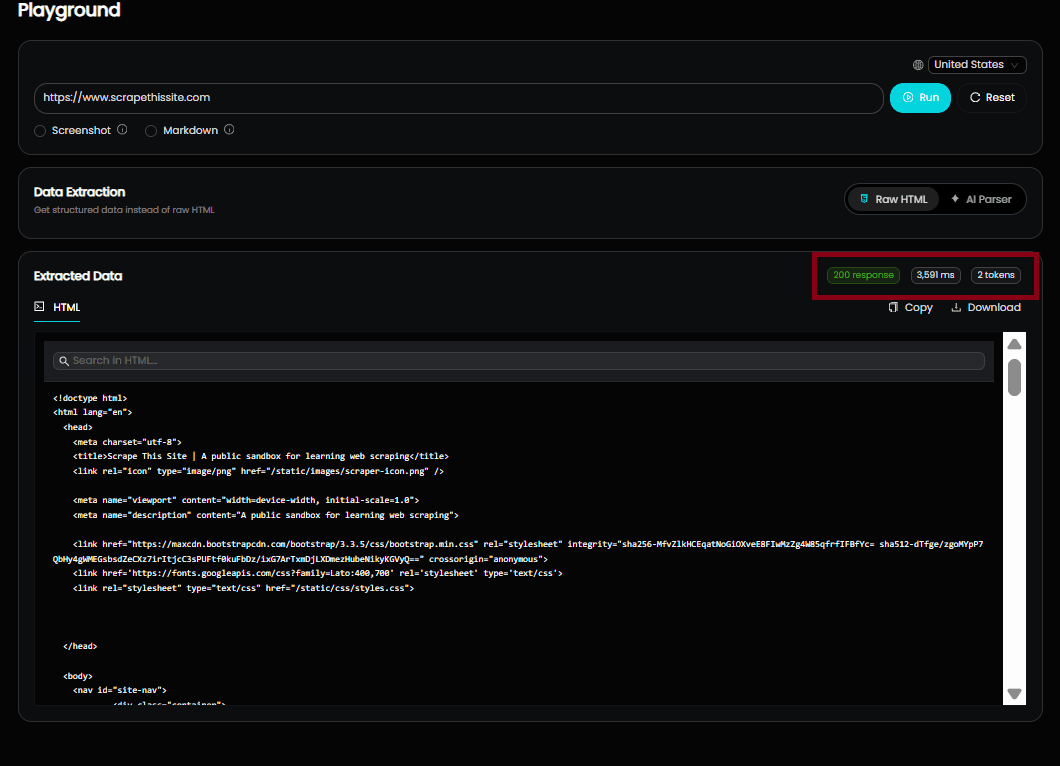
As highlighted in red on the screenshot above:
200 response: Corresponds to the target status code (x-status-code).3,591 ms: Displays the request runtime (runtime).2 tokens: Displays total tokens used for the request (token_usage).
Pagination
Understand how pagination works in the MrScraper API, including parameters for controlling page size and navigating through large datasets.
Error Handling
Learn how the MrScraper API reports errors, including common error codes, response formats, and best practices for handling them in your app.