
Schedule
Learn how to schedule scrapers to run at set times or intervals, keeping data fresh for price monitoring, news aggregation, and off-peak runs.
Schedule allows you to automate the execution of your scrapers at predefined times or intervals. This ensures that your data is always up-to-date without manual intervention. Schedule is useful in scenarios such as:
- Regular Data Updates: If you need to keep your data fresh, such as daily price monitoring or weekly news aggregation.
- Time-Sensitive Data: For data that changes frequently, like stock prices.
- Resource Management: To run scrapers during off-peak hours to optimize resource usage and reduce costs.
Set up a schedule
Follow these steps to schedule a scraper:
On the left sidebar, select Workflow to open the Workflow page.
Select the scraper you want to schedule.
Click the Ellipsis ( ⋮ ) button in the top right corner and click Schedule.
In the Run Frequency dropdown, choose how often the scraper should run:
- Every Hour
- Daily
- Weekly
- Custom: Build your own schedule from one or more intervals (see below).
Select Save Schedule to apply your settings.
Once you save the schedule, the scraper runs automatically. You can view its results on the Results page. To change or stop a schedule, return to the scraper's Schedule settings.
Set a custom interval
Choose Custom when the standard options (hourly, daily, weekly) don't match the frequency you need. A custom schedule is built from schedule rows. Each row holds one interval, and you can add several rows to run a scraper at uneven gaps.
To set a custom interval:
In the Run Frequency dropdown, select Custom.
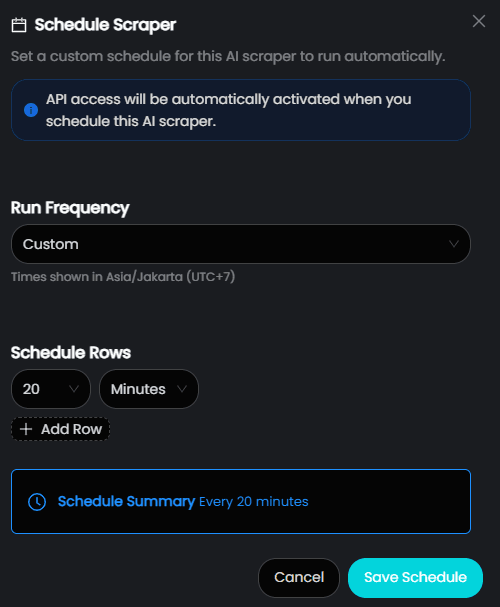
Under Schedule Rows, select a number in the first dropdown, then choose Minutes, Hours, or Days in the second.
If you choose Days, also set the time of day the scraper should run, such as 13:16.
To add another interval, select Add Row and set its number and unit. Repeat for each interval you want in the cycle.
Check the Schedule Summary below the rows. It shows how often the scraper will run. The time zone used for the schedule appears under the Run Frequency dropdown, for example Times shown in Asia/Jakarta (UTC+7).
Select Save Schedule to apply your settings.
Use a single interval
With one schedule row, the scraper runs once every interval you set. Use this method to calculate any custom interval:
Interval = Total minutes in the period ÷ Number of runs you wantFor example, to run a scraper 3 times per hour: 60 ÷ 3 = 20. Set the interval to 20 Minutes.
Use multiple intervals
With more than one schedule row, MrScraper cycles through the rows in order. After each run, it waits the next row's interval, then starts again from the first row once it reaches the end of the list.
For example, with two rows set to 20 Minutes and 10 Minutes, the scraper runs at minutes 20, 30, 50, and 60 of each hour:
| Run | Interval used | Runs at |
|---|---|---|
| 1 | 20 minutes | Minute 20 |
| 2 | 10 minutes | Minute 30 |
| 3 | 20 minutes | Minute 50 |
| 4 | 10 minutes | Minute 60 |
The cycle then repeats in the next hour. Use multiple rows when you want runs clustered around certain points in the hour or day instead of spread evenly.
Marketplace
Discover ready-to-use MrScraper scrapers for popular platforms, runnable directly from the dashboard or in your applications using pre-built request snippets.
S3 Storage
Learn how to save MrScraper results to an S3 bucket, keep a durable copy of every file, and return a signed URL instead of a large response.