
MCP Server
Official MrScraper MCP server for retrieving web pages, Google search, and account usage. Connect AI clients or run the open-source server locally.
MrScraper MCP is the official Model Context Protocol server for MrScraper. It connects AI clients to web page retrieval, Google search, and your account usage.
MrScraper MCP server source code on GitHub · Install the @mrscraper/mcp npm package
The server exposes three tools:
scraperAPI
Retrieve a known page as HTML, Markdown, a screenshot, or a combination.
webSearch
Search Google from query text or a Google search URL.
status
Check subscription status, token usage, remaining tokens, and limits.
Use the hosted Streamable HTTP endpoint for a managed connection, or run the published MCP package locally through Streamable HTTP or stdio.
Package information
This page documents @mrscraper/mcp version 0.2.0. Earlier versions exposed fetch, scrape, serp, rerun, results, and result. See Migration from the previous tool set.
Capabilities
Page Retrieval
Retrieve a known URL with automatic browser fallback, real-device routing, proxy controls, selector waiting, and retry limits.
Google Search
Search Google from query text or a complete Google search URL and select parsed JSON or result-page HTML.
Account Status
Read the subscription, token limit, token usage, remaining tokens, and rate limit.
Managed Endpoint
Connect to the hosted MCP endpoint through Streamable HTTP with OAuth 2.1 browser sign-in.
Structured Tool Results
Receive a consistent response envelope in MCP structured content.
Interactive Widgets
Render Google results and an account usage meter in hosts that support MCP Apps.
Requirements
- A MrScraper account
- An MCP client with Streamable HTTP support
- An API key only when the client cannot use OAuth 2.1 or when running the server locally
Quick start with the hosted server
Add the hosted endpoint
Configure a Streamable HTTP server named mrscraper with no credential:
{
  "mcpServers": {
    "mrscraper": {
      "type": "http",
      "url": "https://mcp.mrscraper.com/mcp"
    }
  }
}
Use this exact URL, including the /mcp path.
Sign in
Connect or reload the MCP server. Your client follows the OAuth 2.1 challenge, opens MrScraper in your browser, and asks you to approve access.
Reload and verify
Reload the client or start a new session, then inspect its MCP tool list.
The connection should expose scraperAPI, webSearch, and status.
Copyable AI setup prompt
Connect MrScraper MCP to this agent. Detect the current MCP client and use its native Streamable HTTP setup to add a server named mrscraper at exactly https://mcp.mrscraper.com/mcp with no static credential. Complete the OAuth 2.1 browser sign-in; if it does not start automatically, use the client's MCP login or authenticate command. Only if the client does not support OAuth, fall back to a MrScraper API key from https://app.mrscraper.com/api-tokens stored through the client's environment-variable or secret-storage mechanism and sent as Authorization: Bearer <key>. Reload the MCP client when required, then list the tools and confirm that scraperAPI, webSearch, and status are available.Client configuration
Add the hosted URL without a static Authorization header, then complete
browser sign-in when the client prompts you.
Codex
codex mcp add mrscraper \
  --url https://mcp.mrscraper.com/mcp
Codex uses OAuth by default for Streamable HTTP servers. If browser sign-in does
not start automatically, run codex mcp login mrscraper.
Claude Code
claude mcp add \
  --transport http \
  --scope user \
  mrscraper https://mcp.mrscraper.com/mcp
Open /mcp inside Claude Code and authenticate, or run
claude mcp login mrscraper from your shell.
Claude and Claude Desktop
Open the custom connector form
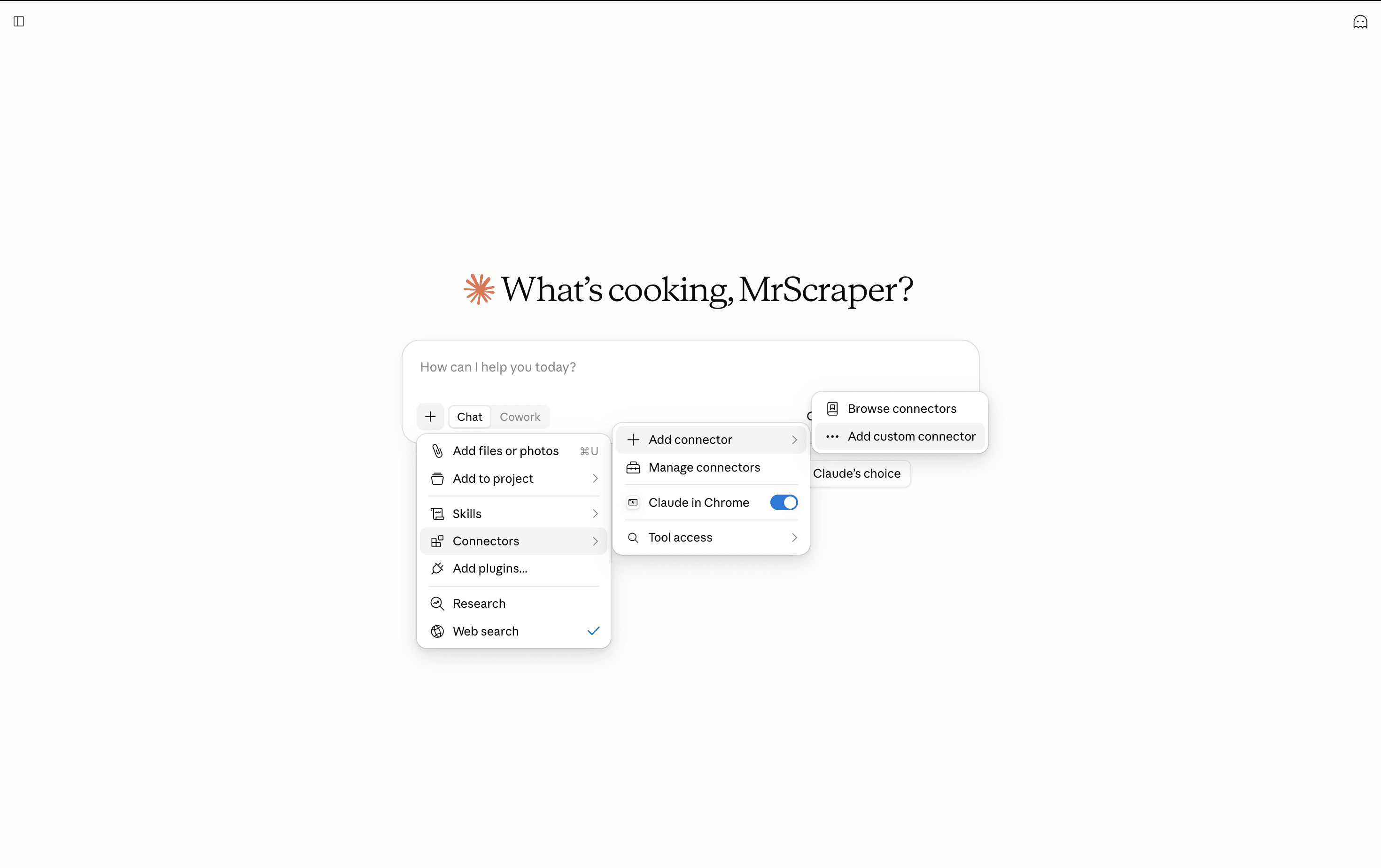
In a general Claude chat, select the + button below the input box, then choose Connectors → Add connector → Add custom connector.
Add MrScraper
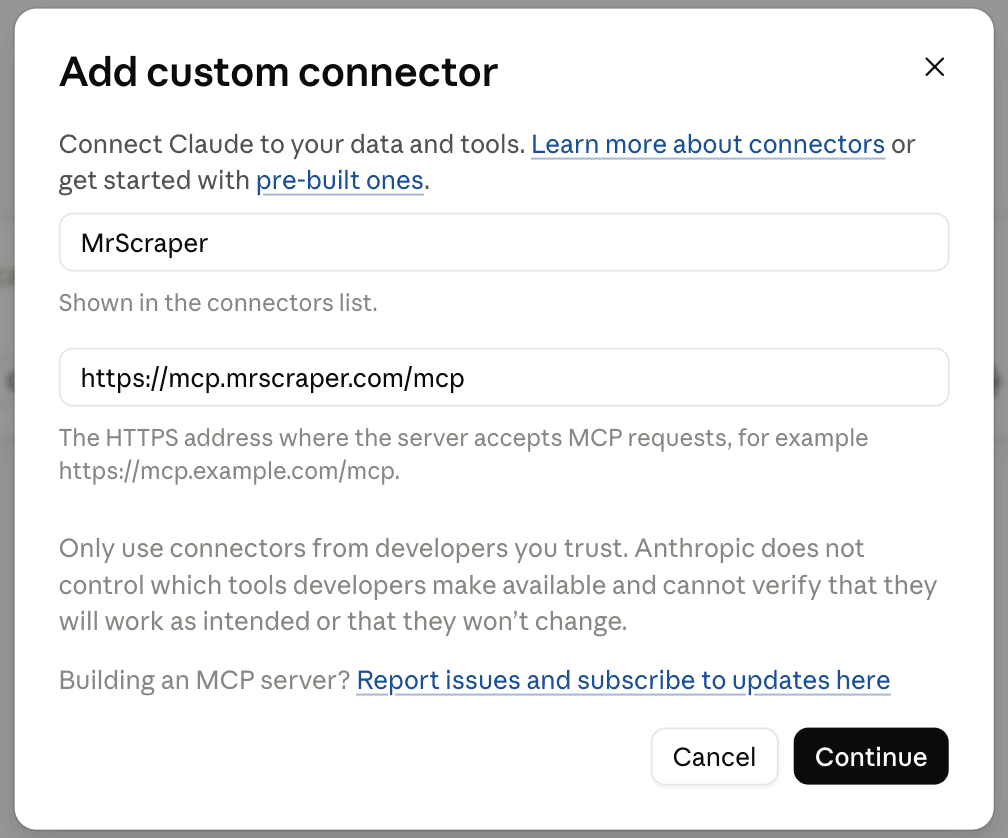
Enter MrScraper as the name and
https://mcp.mrscraper.com/mcp as the MCP server URL, then select
Continue.
Sign in
Complete the MrScraper OAuth browser flow when Claude prompts you.
Cursor
Open Cursor Settings → Tools & MCP → Add Custom MCP, then add:
{
  "mcpServers": {
    "mrscraper": {
      "type": "http",
      "url": "https://mcp.mrscraper.com/mcp"
    }
  }
}
Refresh the MCP server list, then authenticate when prompted.
VS Code
Add the server to your user settings:
{
  "mcp": {
    "servers": {
      "mrscraper": {
        "type": "http",
        "url": "https://mcp.mrscraper.com/mcp"
      }
    }
  }
}
For a workspace configuration, place the server object under servers in
.vscode/mcp.json. Start the server and VS Code opens a browser for OAuth.
Windsurf
Add the following entry to the Windsurf MCP configuration:
{
  "mcpServers": {
    "mrscraper": {
      "serverUrl": "https://mcp.mrscraper.com/mcp"
    }
  }
}
Refresh the MCP server list, then complete OAuth when prompted.
Other MCP clients
Use these connection values:
| Setting | Value |
|---|---|
| Name | mrscraper |
| Transport | Streamable HTTP |
| URL | https://mcp.mrscraper.com/mcp |
| Authentication | OAuth 2.1; do not configure a static header |
API key fallback
If a client cannot complete OAuth, create an API key, store it through the client's secret mechanism, and send it as a bearer token:
{
  "mcpServers": {
    "mrscraper": {
      "type": "http",
      "url": "https://mcp.mrscraper.com/mcp",
      "headers": {
        "Authorization": "Bearer YOUR_MRSCRAPER_API_KEY"
      }
    }
  }
}
For Codex, pass the environment-variable name instead of embedding the key:
export MRSCRAPER_API_KEY="YOUR_MRSCRAPER_API_KEY"
codex mcp add mrscraper \
  --url https://mcp.mrscraper.com/mcp \
  --bearer-token-env-var MRSCRAPER_API_KEY
Authentication
| Connection | Credential source |
|---|---|
| Hosted Streamable HTTP | OAuth 2.1 browser sign-in, or an API key fallback |
| Self-hosted Streamable HTTP | OAuth 2.1 access token, or Authorization: Bearer <MrScraper API key> |
| Local stdio | MRSCRAPER_API_KEY, then MRSCRAPER_API_TOKEN |
The hosted server publishes OAuth 2.1 protected-resource metadata and challenges
unauthenticated clients to start browser sign-in. Access tokens are issued for
the exact https://mcp.mrscraper.com/mcp resource. A tool called without its
required scope returns 403 insufficient_scope, and your client can offer to
grant the missing permission.
| Scope | Tools |
|---|---|
scrape:write | scraperAPI |
scrape:read | webSearch |
account:read | status |
API keys remain supported for clients without OAuth and carry full account authority, so no scope is enforced against them. Authentication stays at the transport layer; tools never accept credentials as arguments.
Run the MCP server locally
Node.js 20 or newer is required.
Published package over stdio
{
  "mcpServers": {
    "mrscraper": {
      "command": "npx",
      "args": ["-y", "@mrscraper/mcp@latest"],
      "env": {
        "MRSCRAPER_API_KEY": "YOUR_MRSCRAPER_API_KEY"
      }
    }
  }
}
Source checkout over Streamable HTTP
Clone and build
git clone https://github.com/mrscraper-com/mrscraper-mcp.git
cd mrscraper-mcp
npm ci
npm run build
Start HTTP transport
TRANSPORT=http npm startThe default endpoint is http://127.0.0.1:8000/mcp.
Connect the client
{
  "mcpServers": {
    "mrscraper": {
      "type": "http",
      "url": "http://127.0.0.1:8000/mcp",
      "headers": {
        "Authorization": "Bearer YOUR_MRSCRAPER_API_KEY"
      }
    }
  }
}
Docker
docker build -f docker/Dockerfile -t mrscraper-mcp .
docker run --rm -p 8000:8000 mrscraper-mcp
The image binds to 0.0.0.0. Apply network controls appropriate for the
deployment and keep bearer verification enabled.
Environment variables
| Variable | Default | Purpose |
|---|---|---|
TRANSPORT | stdio | Selects stdio or http. |
HOST | 127.0.0.1 | HTTP bind address; the Docker image uses 0.0.0.0. |
PORT | 8000 | HTTP listen port. |
MRSCRAPER_API_KEY | — | Primary stdio credential. |
MRSCRAPER_API_TOKEN | — | Alternative stdio credential, also used by the Python SDK. |
MRSCRAPER_HTTP_AUTH | 1 | Enables HTTP bearer verification. |
MRSCRAPER_OAUTH | 1 | Accepts OAuth 2.1 access tokens alongside API keys. |
MRSCRAPER_MCP_PUBLIC_URL | https://mcp.mrscraper.com | Public origin; <origin>/mcp is the required token audience. |
MRSCRAPER_OAUTH_ISSUER | https://api.app.mrscraper.com | Authorization server issuer. |
MRSCRAPER_OAUTH_JWKS_URL | <issuer>/.well-known/jwks.json | Key set used to verify access tokens. |
MRSCRAPER_ALLOWED_ORIGINS | — | Comma-separated browser origins allowed to call the HTTP server. |
MRSCRAPER_API_BASE_URL | MrScraper platform API | Platform endpoint override used by status. |
MRSCRAPER_FETCH_BASE_URL | MrScraper Scraper API | Endpoint override used by scraperAPI. |
MRSCRAPER_SYNC_BASE_URL | MrScraper synchronous scraper API | Endpoint override used by webSearch. |
MRSCRAPER_LOG_HTTP_PAYLOAD | off | Enables trusted-environment request-body diagnostics. |
MRSCRAPER_LOG_HTTP_PAYLOAD_MAX | 8192 | Maximum diagnostic payload length. |
Security behavior
- HTTP authentication is enabled by default.
- Credential-bearing response headers are filtered from tool output.
- Parsed JSON credential metadata is redacted, and network errors redact signed query credentials.
statuscopies only account usage fields, so the API key and billing identifiers in the account record never reach the client.- Browser-origin requests are accepted from trusted local origins, from
claude.aiandchatgpt.com, and from exact values configured throughMRSCRAPER_ALLOWED_ORIGINS. - Tool calls receive the caller's authenticated OAuth token or API key through the MCP transport rather than through tool arguments.
Choosing the right tool
| Starting point | Desired outcome | Tool |
|---|---|---|
| A known URL | HTML, Markdown, a screenshot, or a combination | scraperAPI |
| A topic, keyword, or Google search URL | Google result discovery | webSearch |
| An account | Plan, token usage, and remaining tokens | status |
A discovery workflow commonly uses webSearch first, followed by scraperAPI
for the pages that will inform the answer. Agents produce summaries, tables,
and structured output from the retrieved content.
Migration from the previous tool set
| Previous tool | Replacement |
|---|---|
fetch | scraperAPI; super_mode becomes super, home_page is sent as warmStart, and browser rendering is automatic unless set. |
serp | webSearch; query_or_url becomes url and client_timeout becomes timeout. Set raw=false for parsed JSON. |
status | status for account usage; the domain analytics inputs are removed. |
scrape, rerun, results, result | Removed from the MCP server. Manage AI scrapers, reruns, and stored results in the MrScraper dashboard. |
Reconnect the MCP client after the change so it refreshes its tool list.
Common response envelope
scraperAPI and webSearch return the same envelope through MCP
structuredContent and a formatted JSON text block:
{
  "status_code": 200,
  "data": {},
  "headers": {
    "content-type": "application/json"
  }
}| Field | Type | Description |
|---|---|---|
status_code | number or null | HTTP status returned by the MrScraper service, or null when the request ends before an HTTP response arrives. |
data | JSON value, string, or null | Parsed JSON or response text supplied by the service. |
headers | object | Response headers with credential-bearing headers filtered out. |
error | string, when present | Request failure summary. |
API failures preserve the envelope in structuredContent and set the MCP
result's isError flag. Input-contract errors are returned as MCP tool
errors. status returns the account summary described in its
reference.
Tool reference
The options and defaults of scraperAPI and webSearch follow the Python
SDK's scraper_api and web_search methods. Tool names use camel case;
argument names use snake case.
scraperAPI
Use scraperAPI for a known URL. It calls:
POST https://api.mrscraper.com/The JSON body contains url, maxRetries, and optional tokenCap. Page
options are sent as query parameters.
Basic request
{
  "url": "https://www.scrapethissite.com/pages/simple/"
}
HTML, Markdown, and a screenshot
{
  "url": "https://www.scrapethissite.com/pages/simple/",
  "html": true,
  "markdown": true,
  "screenshot": true
}
Real-device routing from another country
{
  "url": "https://www.scrapethissite.com/pages/simple/",
  "super": true,
  "geo_code": "ID",
  "home_page": true
}
Omit browser_rendering, or set it to null, to let the service try without a
browser and fall back to browser loading when needed. true forces browser
loading and false disables it. A screenshot always forces browser loading.
super selects real-device routing independently of browser rendering.
Response
The page content is in data:
{
  "status_code": 200,
  "data": {
    "html": "<!DOCTYPE html>...",
    "markdown": "...",
    "screenshot": "/9j/4AAQSkZJRgABAQAAAQAB...",
    "token_usage": 3,
    "runtime": 18.02,
    "retry_count": 0,
    "error": null
  },
  "headers": {
    "content-type": "application/json",
    "x-status-code": "200",
    "token_usage": "3"
  }
}
screenshot is a base64-encoded JPEG and can be large. x-status-code is the
target page's status. Usage is calculated from runtime and bandwidth: one plan
token per 30 seconds and one plan token per 0.25 MB, rounded up per component.
Parameters
| Parameter | Required | Default | Request mapping | Description |
|---|---|---|---|---|
url | Yes | — | Body url | Absolute HTTP or HTTPS page URL. |
html | No | true | Query html | Requests HTML content. |
markdown | No | false | Query markdown | Requests Markdown content. |
screenshot | No | false | Query screenshot | Captures a screenshot and forces browser rendering. |
browser_rendering | No | automatic | Query browserRendering | true forces and false disables browser rendering. |
super | No | false | Query super | Real-device routing. |
geo_code | No | "US" | Query geoCode | Proxy country code. |
proxy_country | No | omitted | Query proxyCountry | Compatibility country option. |
use_proxy | No | true | Query useProxy=false when disabled | Allows the service's configured proxy. |
proxy | No | omitted | Query proxy | Custom proxy as username:password@host:port. |
wait_for_selector | No | omitted | Query waitForSelector | CSS selector to wait for. |
home_page | No | false | Query warmStart | Visits the site's root before the target URL. |
block_resources | No | false | Query blockResources | Blocks images, CSS, and fonts. |
bypass_proxy | No | false | Query bypassProxy | Enables the proxy-bypass behavior. |
cookie_jar | No | omitted | Query cookieJar | Cookie configuration, such as domain=example.org&country=us&max_used=100&max_age=50m. |
headers | No | omitted | Query headers | Target page request headers as an object or JSON string. |
max_retries | No | 3 | Body maxRetries | Maximum retries; 0 disables retries. |
token_cap | No | omitted | Body tokenCap | Running token total that stops further retries. |
timeout | No | 120 | Query timeout | Page timeout from 1 to 300 seconds. |
stream | No | omitted | Query stream | Asks the API to stream; the server returns one buffered response. |
discard_token_secret | No | "" | Header x-discard-token-secret | Optional upstream header. |
webSearch
Use webSearch when no target URL is known. It calls:
POST https://sync.scraper.mrscraper.com/api/google/serp/v2/syncParsed results
{
  "url": "web scraping",
  "raw": false,
  "region": "us",
  "language": "en",
  "page": 1
}
raw defaults to true, which requests result-page HTML as the Python SDK
does. Set raw to false for parsed JSON; organic results are in
data.data.organic.
Google search URL
{
  "url": "https://www.google.com/search?q=web+scraping&gl=us&hl=en&start=20",
  "raw": false
}
A Google search URL supplies the query, region, language, and page. This
example derives query="web scraping", region="us", language="en", and
page=3. Explicit options override URL-derived values.
Parameters
| Parameter | Required | Default | Request mapping | Description |
|---|---|---|---|---|
url | Yes | — | Body query | Search text or a complete Google search URL. |
raw | No | true | Body format=html | Requests result-page HTML; set false to use format. |
format | No | "json" | Body format | json or html when raw is false. |
region | No | URL value or omitted | Body region | Country code; overrides gl. |
language | No | URL value or omitted | Body language | Language code; overrides hl. |
page | No | URL value or omitted | Body page | One-based result page; overrides start. |
render_js | No | false | Body renderJs | Renders JavaScript-dependent features such as AI Overview. |
timeout | No | 600 | Local request deadline | Upstream HTTP deadline in seconds. |
status
Use status to check the connected account. It takes no input and calls:
GET https://api.app.mrscraper.com/api/v1/subscription-accountsStatus summary
{
  "kind": "mrscraper-cli-status-summary",
  "source_endpoints": ["/subscription-accounts"],
  "status_code": 200,
  "data": {
    "account": {
      "subscription_status": "active",
      "enterprise": false,
      "token_usage": 61240,
      "token_limit": 100000,
      "token_remaining": 38760,
      "usage_percent": 61.24,
      "rate_limit": 0,
      "rate_ttl": 0,
      "auto_renew": true,
      "ends_at": "2026-12-01T00:00:00.000Z",
      "user": {
        "name": "Ada",
        "email": "ada@example.com",
        "verified": true
      }
    }
  }
}
The summary selects account fields and calculates token_remaining and
usage_percent. An OAuth connection needs the account:read scope.