
Workflow API Access
Learn how to run any scraper you have created through a MrScraper API endpoint, so you can automate scraping or integrate it into your application.
MrScraper lets you run any scraper you've created directly through an API endpoint. This is useful when you want to automate scraping, integrate it into your application, or test requests in tools like Postman.
How to Run a Scraper Through the API
Setup Steps
Open your dashboard and select a scraper you've already created. If you don't have one yet, create it first.
In the scraper window, click Settings.
Select AI Scraper API Access and slide to activate it.
Note
This turns off the AI chat for this scraper and enables API mode.
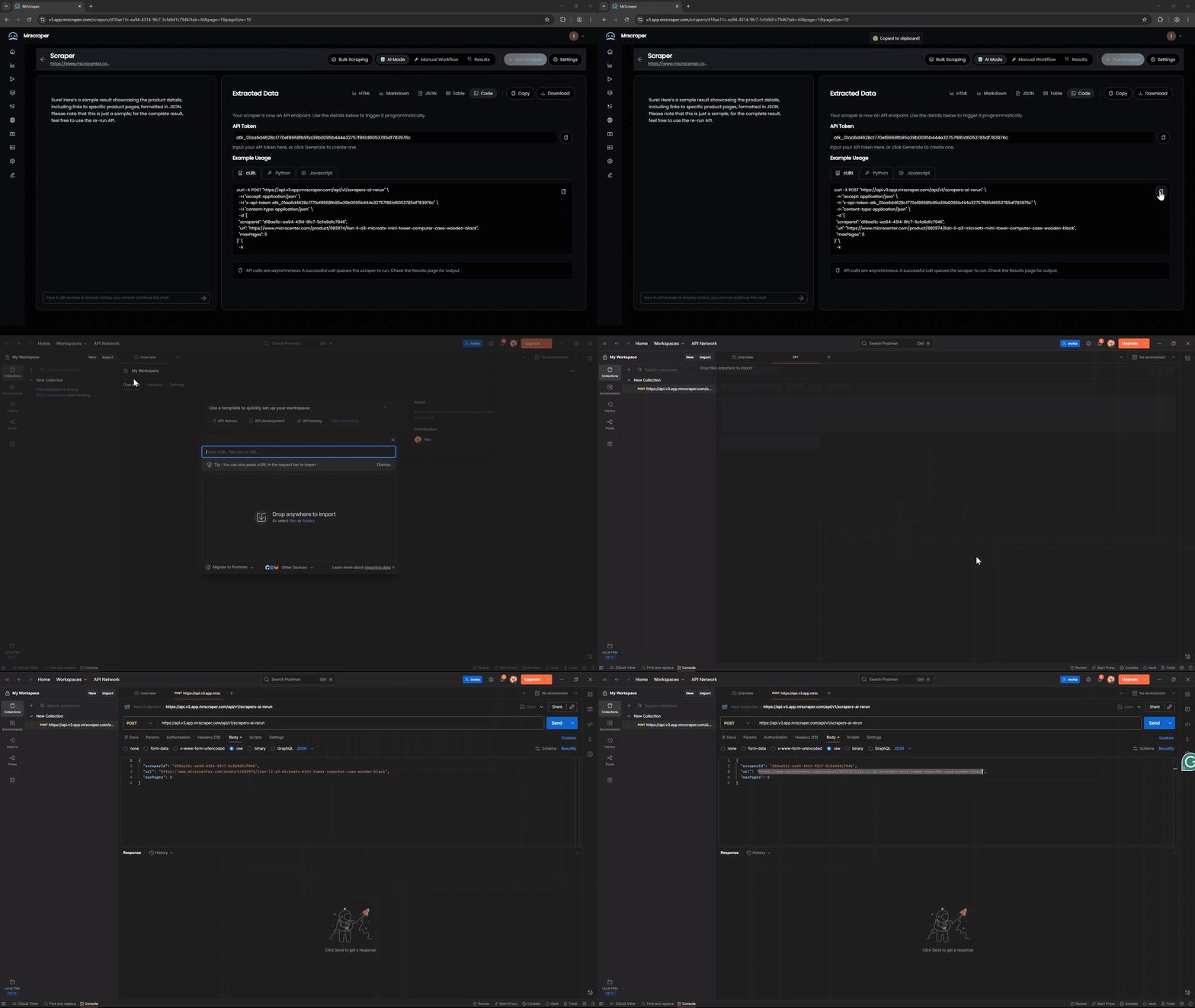
After activation, copy the example API request shown on the page.
Paste the request into Postman (or another API tool).
Note
You can replace the URL with any URL you want to scrape.
You can also run the scraper directly from Rerun an AI Scraper endpoint.
API Request Parameters
| Parameter | Type | Location | Required | Default | Description |
|---|---|---|---|---|---|
x-api-token | string | header | Yes | - | Your MrScraper API token |
scraperId | string | body | Yes | - | The unique ID of the scraper you activated |
url | string | body | Yes | - | The webpage URL you want to scrape |
maxRetry | integer | body | No | 3 | Number of retry attempts if the scraping fails |
maxPages | integer | body | No | 0 | Maximum number of pages to scrape (useful for listing/pagination). Use this to control how many pages you want to extract from multi-page listings |
timeout | integer | body | No | None | Request timeout in seconds. Increase this value if you're scraping many pages or complex websites |
stream | boolean | body | No | false | Enable streaming response mode. Highly recommended when scraping multiple pages that may take several minutes. If the connection is interrupted mid-process, you'll still receive the partial data that was already scraped from completed pages |
About maxPages
If the website has fewer pages than maxPages, it will scrape all available pages.
Example Request Body
Basic Single-Page Scraper
{
  "scraperId": "1c9f4043-b572-462a-ab94-a330672f1af5",
  "url": "https://example.com/property",
  "maxRetry": 3,
  "maxPages": 1,
  "timeout": 300,
  "stream": false
}
Listing Agent API (Multi-Page Scraper)
When scraping listings or paginated content, use the maxPages parameter:
{
  "scraperId": "1c9f4043-b572-462a-ab94-a330672f1af5",
  "url": "https://www.zillow.com/ky/",
  "maxRetry": 3,
  "maxPages": 4,
  "timeout": 1100,
  "stream": false
}
Tip
Timeout Guidelines:
- For single-page scraping: 300-600 seconds is usually sufficient
- For multi-page scraping: Increase timeout proportionally to
maxPages(e.g., 1100+ seconds for 4+ pages) - If you encounter timeout errors, increase the
timeoutvalue
Scraping with Streaming Response
{
  "scraperId": "your-scraper-id",
  "url": "https://example.com/search",
  "maxRetry": 3,
  "maxPages": 10,
  "timeout": 2000,
  "stream": true
}
Important
When to Use stream: true:
- When scraping multiple pages (
maxPages> 1) that may take several minutes - For long-running scraping jobs to prevent data loss
- If connection interruptions occur mid-process, you'll still receive partial data from pages that were already scraped
- Ensures you don't lose all progress if the request is interrupted before completion
Common Use Cases
Scraping a Single Product Page
{
  "scraperId": "your-scraper-id",
  "url": "https://shop.example.com/product/123",
  "maxRetry": 2
}
Scraping Real Estate Listings (Multiple Pages)
{
  "scraperId": "your-scraper-id",
  "url": "https://www.zillow.com/ky/",
  "maxRetry": 3,
  "maxPages": 10,
  "timeout": 2000,
  "stream": true
}
Tip
For multi-page scraping, always set stream: true to ensure you receive data from completed pages even if the process is interrupted.
Best Practices
- Start with lower
maxPagesvalues and increase gradually to test performance - Adjust timeout based on website complexity and number of pages
- Use
stream: truefor multi-page scraping to prevent data loss if the connection is interrupted - Use appropriate retry values (3 is recommended for most cases)
- Monitor your API usage to stay within rate limits
- Test with a single page first before running large batch operations
Troubleshooting
| Issue | Solution |
|---|---|
| Timeout errors | Increase the timeout parameter, especially when using maxPages |
| Failed requests | Check maxRetry value and ensure your API token is valid |
| Incomplete data from listings | Increase maxPages or verify the URL structure |
| Rate limiting | Reduce concurrent requests or contact support for higher limits |
Need Help?
If you encounter issues or need assistance with API integration, contact our support team or check the API Reference for detailed endpoint documentation.