
Playground
Build, test, and validate scraping requests in the MrScraper Playground, preview results, and generate production-ready API code without coding.
The Playground lets you build, test, and validate scraping requests without writing any code. It provides an interactive interface for configuring requests, previewing results, and generating production-ready API code.
What You Can Do
Test Requests
Send API requests and view results instantly.
Adjust Parameters
Experiment with extraction settings and options.
Generate Code
Generate ready-to-use code snippets in multiple languages.
Preview Responses
Inspect the returned data before building your integration.
Playground Overview
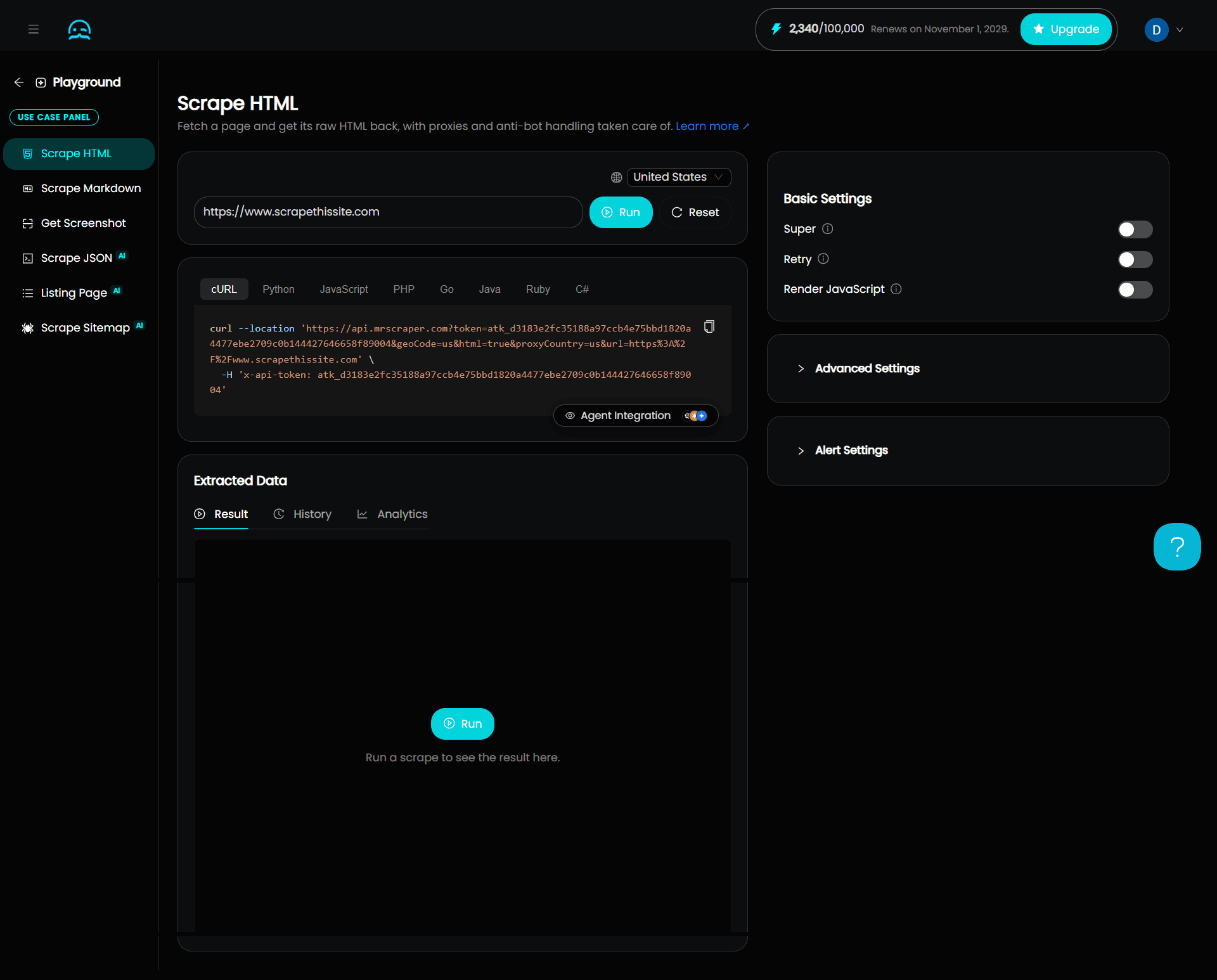
The Playground has these main panels:
- Target URL: Configure and run the request.
- Example Code: Copy generated request code.
- Extracted Data: View the response.
- Settings: Adjust optional loading, rendering, and extraction options (Basic Settings, Advanced Settings, and Automation).
- Alert Settings: Get notified when a scrape returns errors or incomplete data.
Target URL
In the Target URL panel, you configure and run the request:
- Enter the target URL.
- Select Run to send the request, or Reset to clear the current configuration.
- Select a country to load the page from. (Default to
United States)
Example Code
The Example Code panel builds an API request from your current configuration and updates it automatically as you make changes. Copy the code and use it directly in your application.
Supported languages:
- cURL
- Python
- JavaScript
- PHP
- Go
- Java
- Ruby
- C#
Agent Integration
You can view the ready-made prompt for your AI coding agent to integrate MrScraper.
Extracted Data
The Extracted Data panel displays the response MrScraper returns after a request completes :
- HTTP status code
- Total runtime
- Token used

Depending on the use case, the response may include:
- Raw HTML
- Markdown
- JSON
Use this panel to confirm the extracted content matches your requirements before you integrate the request into your application.
Info
This panel can also show history of your previous requests and analytic of your requests.
Default Parameters
| Parameter | Description |
|---|---|
| saveResult=true | Used to save the result to Result tab. |
| geoCode | country to load the page from. (Default to United States) |
| proxyCountry | country to load the page from. (Default to United States) |
Settings
The settings panels contain optional features that control how MrScraper loads, renders, and extracts content. Most websites work with the default settings. Enable these options only when a website needs extra handling, such as JavaScript rendering, geographic targeting, or user interactions.
Note
These settings are optional. In most cases, the default configuration is enough. The available settings vary depending on the selected use case.
Basic Settings
| Setting | Description | Common Use Case | Default |
|---|---|---|---|
| Super | Uses additional resources to improve extraction accuracy on complex websites. | Websites protected by anti-bot systems or containing heavily dynamic content. | Off |
| Retry | Enable retry-related settings for the request. | Unreliable pages or requests that fail intermittently. | Off |
| Max retries | Maximum number of retries for the request. Leave empty for no limit. | Limiting how many times a scrape retries. | 3 |
| Token cap | Maximum total tokens the scrape and its retries can use. | Controlling token usage during testing. See Token Cap. | No Limit |
| Render JavaScript | Render the page using a real Chromium browser. | Required for JavaScript-heavy sites, SPAs, and pages that load content dynamically. | Off |
| Wait Until | Defines when the browser considers navigation complete. 'Network Idle 0' waits until all network activity stops. Most thorough but slowest | Content that loads asynchronously after the initial page load. | Dom Content Loaded |
| Timeout (s) | Maximum seconds to wait for the page to fully load before the request times out. Increase for slow or complex pages | Website that load slowly. | 300 |
| Record | Captures a full-page recording of the rendered page | Get a video to confirm the web load correctly | Off |
| Screenshot area | Top or Full. Top captures the visible viewport at the top of the page. Full captures the entire scroll height. | Get the website view | Full |
Token Cap
The Token Cap limits how many tokens a single scrape and its retries can use in the Playground. It applies to Unblocker and Manual Scraper only.
Use the token cap to keep your costs predictable. Automatic retries are bounded by the cap, so the total tokens for a single run stay at or below the value you set. This makes it easier to estimate and budget token usage while testing.
For how the cap works with retries and how tokens are counted, see Playground Token Cap in Token Plan.
Advanced Settings
Advanced Setting are vary based on Use Cases, check each pages for more details
Alert Settings
The Alert Settings panel notifies you when a scrape returns errors or incomplete data. Configure where alerts go, what triggers them, and how often they're sent.
Channel
Choose where MrScraper sends alerts. Set one or both.
| Field | Description |
|---|---|
| Sends alerts to this email address. | |
| Slack Webhook URL | Sends alerts to a Slack channel using an incoming webhook URL. |
Flag
Set the conditions that trigger an alert. Type a value and press Enter to add it.
| Field | Description | Examples |
|---|---|---|
| Error Flags | Triggers an alert when the response contains one of these errors. | captcha, security, 404, 500 |
| Data Incomplete Flags | Triggers an alert when the extracted data is missing one of these fields. | title, price, url |
Notification Rate
The Identifier sets the key MrScraper uses to group alerts, so the same alert isn't sent repeatedly. Rate Limit and TTL apply separately to each group.
| Field | Description |
|---|---|
| Identifier | The key used to group alerts: Domain or URL. Each group is rate-limited on its own. |
| Rate Limit | Maximum number of alerts sent per group within the TTL period. |
| TTL (seconds) | Time to Live — the length of the rate-limit period, in seconds (for example, 3600 = 1 hour). |
Example
With a rate limit of 3 and errors on example.com and shopee.com:
- Domain: Grouped by domain. Once
example.comhits the limit, its alerts pause for the TTL period, whileshopee.comkeeps its own separate count. - URL: Grouped by full URL.
example.com/path1andexample.com/path2are tracked separately, so each can send its own alert.
Use Cases
Scrape HTML
Fetch complete DOM markup with automatic proxy rotation, geo-targeting, and anti-bot bypass.
Scrape Markdown
Convert web pages into clean, LLM-friendly Markdown by stripping HTML noise and boilerplate.
Get Screenshot
Capture full-page or viewport screenshots of dynamic, JavaScript-rendered web pages.
Scrape JSON
Extract structured, strongly-typed JSON data from single pages using natural language prompts or JSON schemas.
Listing Page
Extract paginated item lists, catalog grids, and search results across multiple pages in a single execution.
Scrape Sitemap
Crawl target sites to map URL architecture, discover endpoints, and generate seed URL lists.
Troubleshooting
If a scrape returns unexpected results, start by enabling Screenshot in the Target URL panel and inspecting the returned image. You can also copy the raw HTML and open it in an HTML viewer to see what MrScraper received. The accordion items below walk through the most common issues in the order you should check them.
Quickstart
A step-by-step guide to making your first MrScraper API request, scraping a product page with the General AI Agent in just a few minutes.
Scrape HTML
Fetch complete, unparsed DOM markup in the Playground with automatic proxy rotation, geo-targeting, and anti-bot bypass, ready for your own parser.